Find the misconfigurations
attackers look for.
KubeGauge audits your Kubernetes clusters from the inside and reports what is exposed — privileged containers, over-permissive RBAC, namespaces with no network policy. One helm install. No inbound access, no kubeconfig upload.
Free plan, no card required. Read-only access to your cluster.
From zero to a scored cluster
Install the agent
One Helm command. The agent runs inside your cluster with read-only RBAC and never opens a port.
It scans and pushes out
On a schedule, it audits workloads, RBAC, network policies, Pod Security Admission, secrets and the control plane — then pushes results over outbound HTTPS. Nothing connects in.
You get findings and a score
One score per cluster, tracked over time. Every failing check tells you what it means, the kubectl command to confirm it yourself, and how to fix it.
helm install kubegauge-agent oci://ghcr.io/kubegauge/charts/kubegauge-agent \
  --namespace kubegauge --create-namespace \
  --set clusterName=production \
  --set ingestUrl=https://api.kubegauge.com \
  --set apiKey=kga_...
What it looks at
40+ posture checks
Workloads, RBAC, network policies, Pod Security Admission, secrets, ingress exposure, image vulnerabilities and the control plane.
Push-only agent
No inbound access, no kubeconfig upload, no credentials leaving your cluster. Read-only RBAC and outbound HTTPS, nothing else.
A score you can track
One number per cluster over time, so you can tell whether last week's fix actually held.
Change detection
See what moved between scans — a namespace that lost its NetworkPolicy, a container that gained privileged: true.
Compliance frameworks
Findings mapped to CIS Benchmark, ISO 27001, PCI DSS and more, exportable as a report. Available on paid plans.
Every finding, explained
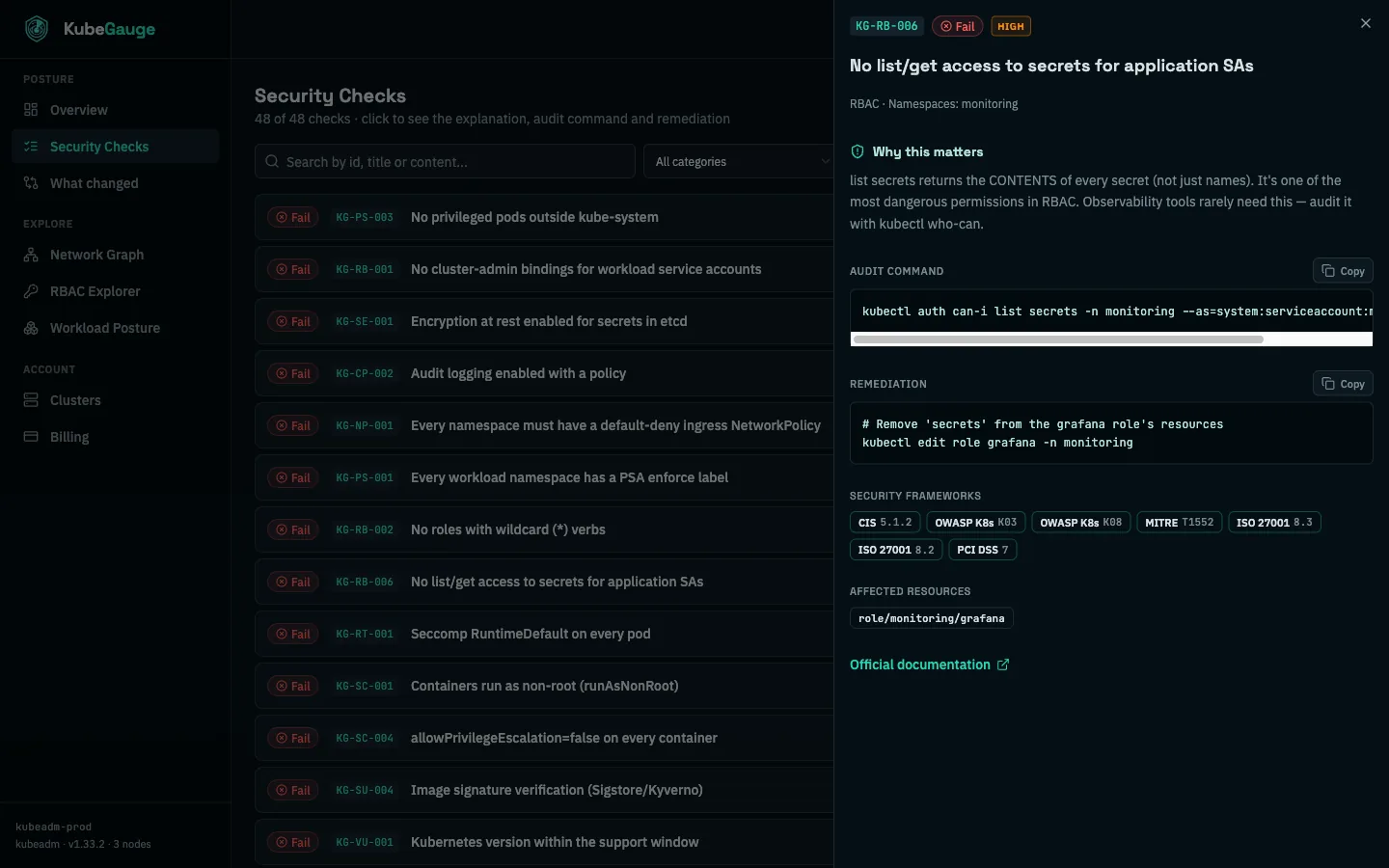
The audit command, the remediation and the official docs on every check — enough context to fix it without a security specialist on the team.
Not just a red light
A scanner that only tells you something failed leaves you with the hard part. Every KubeGauge finding carries the reason it matters, the exact command to verify it on your own cluster, and the change that fixes it.
That depth is what lets a team without a dedicated security engineer act on a finding the same day it shows up, instead of filing it.
Simple monthly pricing
Start free, upgrade when your clusters do.